🔓 Cracking the Encryption Key for Filen CLI Profiles
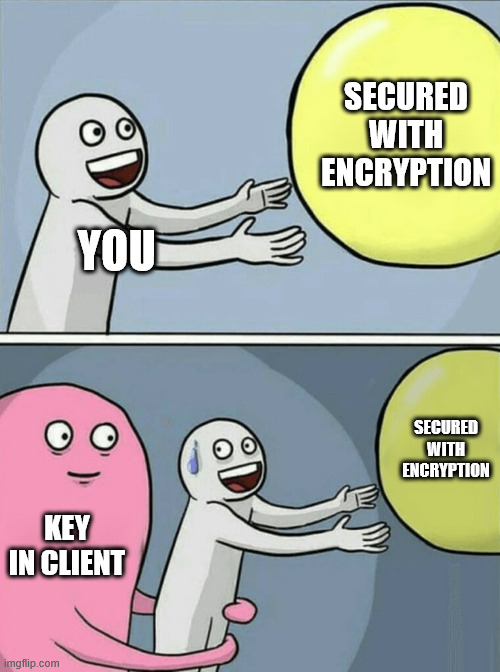
It’s been a while since my last blog post, but here we go again! A friend recently mentioned that the Filen-CLI was missing a speed indicator - a pretty essential feature for cloud drive management software. I thought, “Why not?” and quickly added one. It’s already merged into the project, so check out this PR if you’re curious.
🧵 TL;DR
- The Filen CLI saves credentials encrypted using AES-256-GCM.
- The encryption key is derived using PBKDF2 with SHA-512 and 600,000 iterations, using a salt file.
- However, the base key was embedded in the compiled binary, meaning anyone could extract it and decrypt any credentials.
- Filen was informed. They acknowledged it and moved the secret to be stored securely using OS-level secret stores (Keychain, Credential Manager, etc.).
- Lesson: Never store secrets in client-side code. If a user (or attacker) can access the binary, they can extract the key.
🕵️♂️ The Curiosity Kicks In
When you first run the CLI tool, it asks for your Filen credentials and whether you want to save them:
$ ./filen-cli-v0.0.29-linux-x64
Please enter your Filen credentials:
Email: [email address]
Password: ***********************************
Please enter your 2FA code or recovery key: ******
Save credentials locally for future invocations? [y/N] y
You can delete these credentials using `filen delete-credentials`
The credentials get saved to ~/.config/filen-cli/.credentials, along with a .credentials.salt file. If you open .credentials, all you see is a bunch of hex values, nothing readable. That, plus the .salt file, strongly suggests encryption. As a normal user, I wouldn’t have thought much of it… But as a developer, things got interesting when I ran into a build error:
$ npm run build
Error: ENOENT: no such file or directory, open 'key'
Wait… What? There’s a missing key file? Okay, let’s dig deeper.
🧩 Reverse-Engineering the Decryption Process
By checking out injectBuildInfo.mjs file, I found that the “key” is either pulled from an environment variable or read from a file named “key”. Official Filen CLI builds use GitHub Actions, which store FILEN_CLI_CRYPTO_BASE_KEY as a secret, so there’s no direct way to retrieve it.
🔐 Breaking Down the Encryption
Looking at filen-cli/src/auth/credentialsCrypto.ts, I found out how the credentials file is encrypted:
- Key Derivation: The
.credentials.saltfile is used to derive the encryption key using PBKDF2 (SHA-512, 600,000 iterations).
private deriveEncryptionKey(): Promise<Buffer> {
    return new Promise((resolve, reject) => {
        crypto.pbkdf2(this.key, this.salt, 600_000, 256 / 8, "sha512", (err, derivedKey) => {
            if (err) reject(err);
            else resolve(derivedKey);
        });
    });
}
- Encryption: The encryption method is AES-256-GCM, with a 12-byte IV. The final encrypted output includes the IV, ciphertext, and authentication tag.
public async encrypt(credentials: FilenSDKConfig): Promise<string> {
    const derivedKey = await this.deriveEncryptionKey();
    const iv = crypto.randomBytes(12);
    const cipher = crypto.createCipheriv("aes-256-gcm", derivedKey, iv);
    const encrypted = Buffer.concat([cipher.update(JSON.stringify(credentials)), cipher.final()]);
    const authTag = cipher.getAuthTag();
    return Buffer.concat([iv, encrypted, authTag]).toString("hex");
}
- The “Secret” Key: The key is injected at build time from
filen-cli/src/buildinfo.ts:
export const key: string = ""
Alright, so the encryption is strong, but the key is stored somewhere inside the compiled binary. Time to go hunting.
🧨 Extracting the Key from the Binary
🪓 Brute-force
Given the above observation, we can safely say that the key must be inside the official binaries Since the source file indicated that the “key” is a string and the key is 32 bytes. Since 32 bytes is equal to 64 hexadecimal characters, I ran:
$ strings filen-cli-v0.0.29-linux-x64 | egrep -i '^[0-9a-f]{64}$'
This gave me 359 potential hits. Brute-forcing all of them is doable, but let’s take a smarter approach.
🧬 Binary Analysis
I searched the binary for references to buildInfo.ts and found this section:
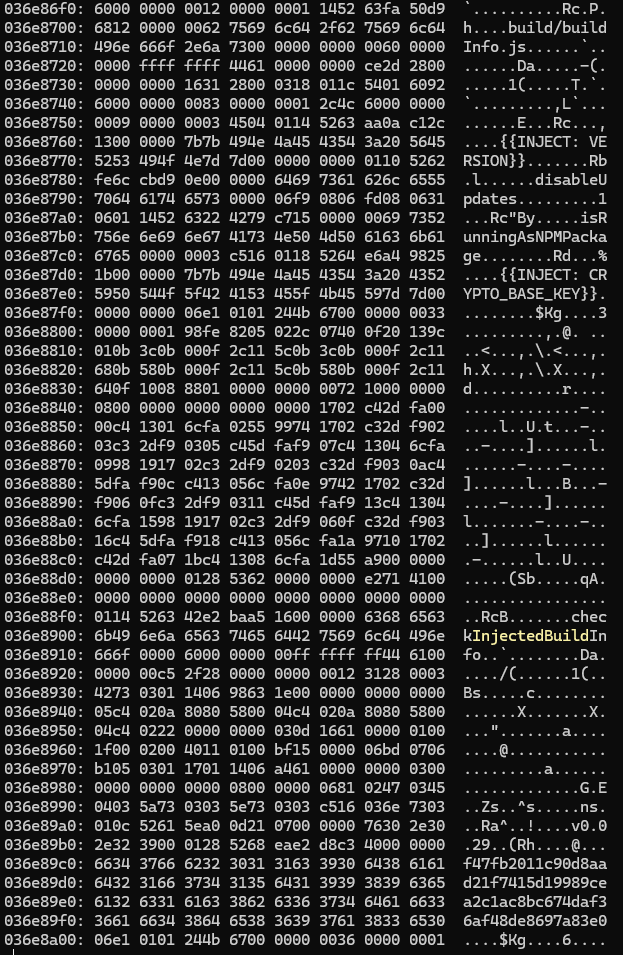
See that 64-character hex string at the end? Given the surrounding context, it looks like the decryption key!
🧪 Decrypting the Credentials
With the key in hand, I recreated the decryption process by reusing some code from credentialsCrypto.ts:
const path = require('path');
const fsModule = require('fs');
const crypto = require('crypto');

const key = "f47fb2011c90d8aad21f7415d19989cea2c1ac8bc674daf36af48de8697a83e0"
const saltFile = path.join(".credentials.salt")
const salt = fsModule.readFileSync(saltFile).toString()

async function deriveEncryptionKey() {
	return new Promise((resolve, reject) => {
		crypto.pbkdf2(key, salt, 600_000, 256 / 8, "sha512", (err, derivedKey) => {
			if (err) reject(err)
			else resolve(derivedKey)
		})
	})
}

async function decrypt(encrypted) {
	const derivedKey = await deriveEncryptionKey()
	const data = Buffer.from(encrypted, "hex")
	const iv = data.subarray(0, 12)
	const encData = data.subarray(12)
	const authTag = encData.subarray(-16)
	const ciphertext = encData.subarray(0, encData.byteLength - 16)
	const decipher = crypto.createDecipheriv("aes-256-gcm", derivedKey, iv)
	decipher.setAuthTag(authTag)
	const decrypted = Buffer.concat([decipher.update(ciphertext), decipher.final()]).toString("utf-8")
	return JSON.parse(decrypted)
}

(async () => {
	const encryptedConfig = await fsModule.promises.readFile(".credentials", { encoding: "utf-8" })
	const config = await decrypt(encryptedConfig);
	console.log(config);
})();
Then, put all the files together.

And boom! The decrypted credentials appear:
💥 And boom!
The decrypted credentials file appear:
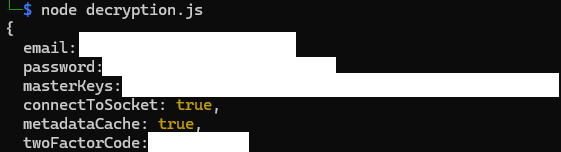
So, yeah. It turns out the encryption was basically pointless since the key was right there in the binary all along
📢 Disclosure
I reported this issue to Filen back in December, and they acknowledged it. Their solution? Moving the encryption key to a local secret store like Credential Manager or Keychain. Interestingly, this change had already been implemented before I reported it and was included in the v0.0.31 release three months later.
📅 Timeline
- 28 Dec 2024 - New way to store the secret is introduced (b8d1223)
- 30 Dec 2024 - Issue reported to vendor
- 30 Dec 2024 - Issue acknowledged by vendor (several minutes later, speed of light!)
- 22 Mar 2025 - Proper fix released in v0.0.31
🎓 Security 101
Any secret embedded in client-side code, binaries, frontends, mobile apps, or browser extensions is not a secret. Obfuscation is not encryption, and even encryption is just a speed bump if the key is nearby. Even Digital Rights Management (DRM) can be bypassed — so never trust client-side binaries to securely “hide” secrets.
✅ Instead: To securely access and store secrets locally, fetch them at runtime through a secure channel, and store them using OS-level secure storage (such as Keychain, Credential Manager, or GNOME Keyring).
🧠 Always keep this in mind:
If it runs on the client, it’s already compromised.
Stay safe out there!
Metadata
Cracking the Encryption Key for Filen CLI Profiles Comment Section